How to Integrate Camoufox with CapSolver for Seamless CAPTCHA Solving

Ethan Collins
Pattern Recognition Specialist
TL;DR: Use Camoufox to evade browser fingerprinting and CapSolver to automatically solve CAPTCHAs like Cloudflare Turnstile and reCAPTCHA v2/v3. Together, they enable stable, human-like web automation at scale with minimal detection and high success rates.
Introduction
Web automation has become essential for data collection, testing, and various business operations. However, modern websites deploy sophisticated anti-bot measures and CAPTCHAs that can halt even the most carefully crafted automation scripts.
The combination of Camoufox and CapSolver provides a powerful solution to this challenge:
- Camoufox: An open-source anti-detect browser built on Firefox that evades bot detection through advanced fingerprint spoofing
- CapSolver: An AI-powered CAPTCHA solving service that handles Cloudflare Turnstile, reCAPTCHA and more
Together, these tools enable seamless web automation that bypasses both fingerprint detection and CAPTCHA challenges.
Integration Objectives
This guide will help you achieve three core goals:
- Evade Bot Detection - Use Camoufox's fingerprint injection to appear as a legitimate browser
- Automatically Solve CAPTCHAs - Integrate CapSolver's API to handle CAPTCHA challenges without manual intervention
- Maintain Human-Like Behavior - Combine humanized mouse movements with intelligent CAPTCHA solving
What is Camoufox?
Camoufox is a stealthy, minimalistic custom build of Firefox designed specifically for web scraping and automation. Unlike other anti-detect solutions that rely on JavaScript injection (which can be detected), Camoufox implements fingerprint spoofing at the C++ level within the browser itself.
Key Features
- Fingerprint Injection - Spoofs navigator properties, screen dimensions, WebGL, WebRTC, fonts, and more at the native level
- Human-Like Mouse Movement - Built-in cursor humanization algorithm for realistic interactions
- BrowserForge Integration - Generates fingerprints that mimic real-world device distributions
- GeoIP Support - Automatically calculates timezone, locale, and geolocation based on proxy IP
- Firefox Add-on Support - Load custom extensions including ad blockers
Installation
bash
# Install the Python package
pip install -U camoufox[geoip]

# Download the Camoufox browser
camoufox fetch
Basic Usage
python
from camoufox.sync_api import Camoufox

with Camoufox(humanize=True) as browser:
    page = browser.new_page()
    page.goto("https://example.com")
What is CapSolver?
CapSolver is an AI-powered automatic CAPTCHA solving service that supports a wide range of CAPTCHA types. It provides a simple API that allows you to submit CAPTCHA challenges and receive solutions within seconds.
Supported CAPTCHA Types
- Cloudflare Turnstile - The most common modern anti-bot challenge
- reCAPTCHA v2 - Image-based and invisible variants
- reCAPTCHA v3 - Score-based verification
- AWS WAF - Amazon Web Services CAPTCHA
- And many more...
Getting Started with CapSolver
- Sign up at capsolver.com
- Add funds to your account
- Get your API key from the dashboard
Bonus: Use code
CAMOUFOXwhen registering to receive bonus credits!
Pre-Integration Challenges
Before combining Camoufox with CapSolver, web automation faced several pain points:
| Challenge | Impact |
|---|---|
| Browser fingerprint detection | Scripts blocked before reaching content |
| CAPTCHA challenges | Manual solving required, breaking automation |
| IP reputation systems | Proxies quickly flagged and banned |
| Behavioral analysis | Non-human patterns detected |
The Camoufox + CapSolver integration solves all these challenges in one workflow.
Integration Methods
Method 1: API Integration (Recommended)
The API integration approach gives you full control over the CAPTCHA solving process and works with any CAPTCHA type.
Setup Requirements
bash
pip install camoufox[geoip] httpxCore Integration Pattern
python
import asyncio
import httpx
from camoufox.async_api import AsyncCamoufox

CAPSOLVER_API_KEY = "YOUR_API_KEY"
CAPSOLVER_API = "https://api.capsolver.com"


async def create_task(task_payload: dict) -> str:
    """Create a CAPTCHA solving task and return the task ID."""
    async with httpx.AsyncClient() as client:
        response = await client.post(
            f"{CAPSOLVER_API}/createTask",
            json={
                "clientKey": CAPSOLVER_API_KEY,
                "task": task_payload
            }
        )
        result = response.json()
        if result.get("errorId") != 0:
            raise Exception(f"CapSolver error: {result.get('errorDescription')}")
        return result["taskId"]


async def get_task_result(task_id: str, max_attempts: int = 120) -> dict:
    """Poll for task result until solved or timeout."""
    async with httpx.AsyncClient() as client:
        for _ in range(max_attempts):
            response = await client.post(
                f"{CAPSOLVER_API}/getTaskResult",
                json={
                    "clientKey": CAPSOLVER_API_KEY,
                    "taskId": task_id
                }
            )
            result = response.json()

            if result.get("status") == "ready":
                return result["solution"]
            elif result.get("status") == "failed":
                raise Exception(f"Task failed: {result.get('errorDescription')}")

            await asyncio.sleep(1)

    raise TimeoutError("CAPTCHA solving timed out")


async def solve_captcha(task_payload: dict) -> dict:
    """Complete CAPTCHA solving workflow."""
    task_id = await create_task(task_payload)
    return await get_task_result(task_id)
Method 2: Browser Extension
You can also use the CapSolver browser extension with Camoufox for a more hands-off approach.
Installation Steps
- Download the CapSolver extension from capsolver.com/en/extension
- Extract the extension files
- Load it into Camoufox:
python
from camoufox.sync_api import Camoufox

with Camoufox(
    addons=["/path/to/capsolver-extension"],
    headless=False  # Extensions require headed mode
) as browser:
    page = browser.new_page()
    # The extension will automatically detect and solve CAPTCHAs
Code Examples
Example 1: Solving Cloudflare Turnstile
Cloudflare Turnstile is one of the most common CAPTCHA challenges. Here's how to solve it:
python
import asyncio
from camoufox.async_api import AsyncCamoufox

CAPSOLVER_API_KEY = "YOUR_API_KEY"
CAPSOLVER_API = "https://api.capsolver.com"


async def solve_turnstile(site_key: str, page_url: str) -> str:
    """Solve Cloudflare Turnstile and return the token."""
    import httpx

    async with httpx.AsyncClient() as client:
        # Create the task
        response = await client.post(
            f"{CAPSOLVER_API}/createTask",
            json={
                "clientKey": CAPSOLVER_API_KEY,
                "task": {
                    "type": "AntiTurnstileTaskProxyLess",
                    "websiteURL": page_url,
                    "websiteKey": site_key,
                }
            }
        )
        task_id = response.json()["taskId"]

        # Poll for result
        while True:
            result = await client.post(
                f"{CAPSOLVER_API}/getTaskResult",
                json={
                    "clientKey": CAPSOLVER_API_KEY,
                    "taskId": task_id
                }
            )
            data = result.json()

            if data.get("status") == "ready":
                return data["solution"]["token"]

            await asyncio.sleep(1)


async def main():
    target_url = "https://example.com/protected-page"
    turnstile_site_key = "0x4XXXXXXXXXXXXXXXXX"  # Find this in page source

    async with AsyncCamoufox(
        humanize=True,
        headless=False,
        os="windows"
    ) as browser:
        page = await browser.new_page()
        await page.goto(target_url)

        # Wait for Turnstile to load
        await page.wait_for_selector('input[name="cf-turnstile-response"]', timeout=10000)

        # Solve the CAPTCHA
        token = await solve_turnstile(turnstile_site_key, target_url)
        print(f"Got Turnstile token: {token[:50]}...")

        # Inject the token
        await page.evaluate(f'''
            document.querySelector('input[name="cf-turnstile-response"]').value = "{token}";

            // Also set the hidden callback if present
            const callback = document.querySelector('[data-callback]');
            if (callback) {{
                const callbackName = callback.getAttribute('data-callback');
                if (window[callbackName]) {{
                    window[callbackName]('{token}');
                }}
            }}
        ''')

        # Submit the form
        await page.click('button[type="submit"]')
        await page.wait_for_load_state("networkidle")

        print("Successfully bypassed Turnstile!")


if __name__ == "__main__":
    asyncio.run(main())
Example 2: Solving reCAPTCHA v2
python
import asyncio
from camoufox.async_api import AsyncCamoufox

CAPSOLVER_API_KEY = "YOUR_API_KEY"
CAPSOLVER_API = "https://api.capsolver.com"


async def solve_recaptcha_v2(site_key: str, page_url: str) -> str:
    """Solve reCAPTCHA v2 and return the token."""
    import httpx

    async with httpx.AsyncClient() as client:
        # Create the task
        response = await client.post(
            f"{CAPSOLVER_API}/createTask",
            json={
                "clientKey": CAPSOLVER_API_KEY,
                "task": {
                    "type": "ReCaptchaV2TaskProxyLess",
                    "websiteURL": page_url,
                    "websiteKey": site_key,
                }
            }
        )
        result = response.json()

        if result.get("errorId") != 0:
            raise Exception(f"Error: {result.get('errorDescription')}")

        task_id = result["taskId"]

        # Poll for result
        while True:
            result = await client.post(
                f"{CAPSOLVER_API}/getTaskResult",
                json={
                    "clientKey": CAPSOLVER_API_KEY,
                    "taskId": task_id
                }
            )
            data = result.json()

            if data.get("status") == "ready":
                return data["solution"]["gRecaptchaResponse"]
            elif data.get("status") == "failed":
                raise Exception(f"Failed: {data.get('errorDescription')}")

            await asyncio.sleep(2)


async def main():
    target_url = "https://example.com/login"
    recaptcha_site_key = "6LcXXXXXXXXXXXXXXXXXXXXXXXXX"  # Find in page source

    async with AsyncCamoufox(
        humanize=True,
        headless=False,
        os=["windows", "macos"]  # Random OS selection
    ) as browser:
        page = await browser.new_page()
        await page.goto(target_url)

        # Fill in form fields with human-like delays
        await page.fill('input[name="username"]', "user@example.com")
        await asyncio.sleep(0.5)  # Human-like pause
        await page.fill('input[name="password"]', "password123")

        # Solve the CAPTCHA
        print("Solving reCAPTCHA v2...")
        token = await solve_recaptcha_v2(recaptcha_site_key, target_url)
        print(f"Got token: {token[:50]}...")

        # Inject the token into the reCAPTCHA response field
        await page.evaluate(f'''
            document.getElementById('g-recaptcha-response').innerHTML = '{token}';
            document.getElementById('g-recaptcha-response').style.display = 'block';
        ''')

        # Submit the form
        await page.click('button[type="submit"]')
        await page.wait_for_load_state("networkidle")

        print("Login successful!")


if __name__ == "__main__":
    asyncio.run(main())
Example 3: Solving reCAPTCHA v3
reCAPTCHA v3 is score-based and doesn't require user interaction. You need to specify the action parameter.
python
import asyncio
from camoufox.async_api import AsyncCamoufox

CAPSOLVER_API_KEY = "YOUR_API_KEY"
CAPSOLVER_API = "https://api.capsolver.com"


async def solve_recaptcha_v3(
    site_key: str,
    page_url: str,
    action: str = "verify",
    min_score: float = 0.7
) -> str:
    """Solve reCAPTCHA v3 with specified action and minimum score."""
    import httpx

    async with httpx.AsyncClient() as client:
        response = await client.post(
            f"{CAPSOLVER_API}/createTask",
            json={
                "clientKey": CAPSOLVER_API_KEY,
                "task": {
                    "type": "ReCaptchaV3TaskProxyLess",
                    "websiteURL": page_url,
                    "websiteKey": site_key,
                    "pageAction": action,
                    "minScore": min_score
                }
            }
        )
        result = response.json()

        if result.get("errorId") != 0:
            raise Exception(f"Error: {result.get('errorDescription')}")

        task_id = result["taskId"]

        while True:
            result = await client.post(
                f"{CAPSOLVER_API}/getTaskResult",
                json={
                    "clientKey": CAPSOLVER_API_KEY,
                    "taskId": task_id
                }
            )
            data = result.json()

            if data.get("status") == "ready":
                return data["solution"]["gRecaptchaResponse"]
            elif data.get("status") == "failed":
                raise Exception(f"Failed: {data.get('errorDescription')}")

            await asyncio.sleep(1)


async def main():
    target_url = "https://example.com/search"
    recaptcha_v3_key = "6LcXXXXXXXXXXXXXXXXXXXXXXXXX"

    async with AsyncCamoufox(
        humanize=2.0,  # Max 2 second humanized movements
        headless=True,  # Can run headless for v3
        geoip=True,  # Auto-detect geolocation from proxy
    ) as browser:
        page = await browser.new_page()
        await page.goto(target_url)

        # Solve reCAPTCHA v3 with "search" action
        print("Solving reCAPTCHA v3...")
        token = await solve_recaptcha_v3(
            recaptcha_v3_key,
            target_url,
            action="search",
            min_score=0.9  # Request high score
        )

        # Execute the callback with the token
        await page.evaluate(f'''
            // Submit token via the site's callback
            grecaptcha.execute('{recaptcha_v3_key}', {{action: 'search'}})
                .then(function(originalToken) {{
                    // Replace with our solved token
                    submitSearch('{token}');
                }});
        ''')

        print("reCAPTCHA v3 bypassed!")


if __name__ == "__main__":
    asyncio.run(main())
Best Practices
1. Proxy Rotation with GeoIP
Use Camoufox's GeoIP feature to automatically match fingerprints to your proxy location:
python
async with AsyncCamoufox(
    geoip=True,  # Auto-detect from proxy IP
    proxy={
        "server": "http://proxy.example.com:8080",
        "username": "user",
        "password": "pass"
    }
) as browser:
    # Fingerprint will match proxy's geographic location
    pass
2. Fingerprint Consistency
Keep fingerprints consistent within a session but rotate between sessions:
python
from browserforge.fingerprints import Screen

# Constrain to common screen sizes
screen = Screen(
    min_width=1280,
    max_width=1920,
    min_height=720,
    max_height=1080
)

async with AsyncCamoufox(
    os="windows",
    screen=screen,
) as browser:
    pass
3. Rate Limiting
Avoid triggering rate limits by adding delays:
python
import random

async def human_delay():
    """Random delay to mimic human behavior."""
    await asyncio.sleep(random.uniform(1.0, 3.0))

# Use between actions
await page.click('button')
await human_delay()
await page.fill('input', 'text')
4. Error Handling
Always implement proper error handling for CAPTCHA solving:
python
async def solve_with_retry(task_payload: dict, max_retries: int = 3) -> dict:
    """Solve CAPTCHA with retry logic."""
    for attempt in range(max_retries):
        try:
            return await solve_captcha(task_payload)
        except TimeoutError:
            if attempt < max_retries - 1:
                print(f"Timeout, retrying... ({attempt + 1}/{max_retries})")
                await asyncio.sleep(5)
            else:
                raise
        except Exception as e:
            if "balance" in str(e).lower():
                raise  # Don't retry balance errors
            if attempt < max_retries - 1:
                await asyncio.sleep(2)
            else:
                raise
Bonus: Get Started Today!
Ready to supercharge your web automation with Camoufox and CapSolver?
Use code CAMOUFOX when signing up at CapSolver to receive bonus credits!
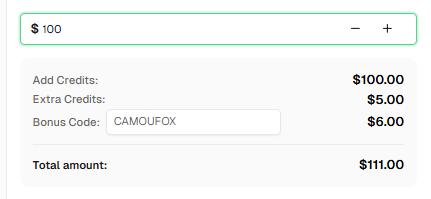
This exclusive bonus helps you get started with CAPTCHA solving right away.
Conclusion
The integration of Camoufox and CapSolver creates a powerful toolkit for web automation:
- Camoufox handles bot detection with native-level fingerprint spoofing
- CapSolver handles CAPTCHAs with AI-powered solving
- Together they enable seamless automation that appears fully human
Whether you're building web scrapers, automated testing systems, or data collection pipelines, this combination provides the reliability and stealth you need.
FAQ
Q: Which CAPTCHA types work best with this integration?
A: CapSolver supports all major CAPTCHA types. Cloudflare Turnstile and reCAPTCHA v2/v3 have the highest success rates. The integration works seamlessly with any CAPTCHA that CapSolver supports.
Q: Can I use this in headless mode?
A: Yes! Camoufox supports headless mode and maintains its fingerprint spoofing capabilities. For reCAPTCHA v3 and token-based CAPTCHAs, headless mode works perfectly. For v2 visible CAPTCHAs, headed mode may provide better results.
Q: How do I find the site key for a CAPTCHA?
A: Look in the page source for:
- Turnstile:
data-sitekeyattribute orcf-turnstileelements - reCAPTCHA:
data-sitekeyattribute ong-recaptchadiv
Q: What if CAPTCHA solving fails?
A: Common solutions:
- Verify your API key and balance
- Ensure the site key is correct
- Check that the page URL matches where the CAPTCHA appears
- For v3, try adjusting the action parameter and minimum score
- Implement retry logic with delays
Q: Does Camoufox work with Selenium?
A: Camoufox is built around Playwright, not Selenium. However, you can use the same CapSolver API integration pattern with any browser automation framework.
More
web scrapingApr 22, 2026
Rust Web Scraping Architecture for Scalable Data Extraction
Learn scalable Rust web scraping architecture with reqwest, scraper, async scraping, headless browser scraping, proxy rotation, and compliant CAPTCHA handling.

web scrapingApr 17, 2026
How to Scrape Job Listings Without Getting Blocked
Learn the best techniques to scrape job listings without getting blocked. Master Indeed scraping, Google Jobs API, and web scraping API with CapSolver.